

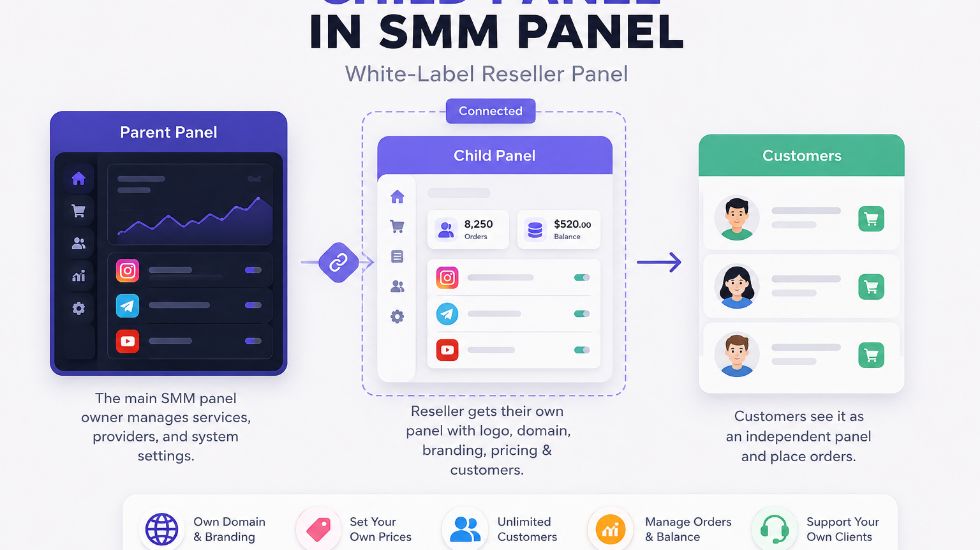
A child panel is not just another menu inside an SMM panel. It is closer to a small branded storefront connected to a larger service engine. The reseller owns the customer-facing brand, but the actual service supply usually comes from a parent panel in the background.
That is why this topic matters for resellers, agencies, freelancers, and anyone who wants to start an SMM business without building a full technical platform from zero. A child panel can save time, but it also creates dependency: your customer experience depends heavily on the parent panel’s service quality, uptime, refill rules, API connection, and support behavior.
For users focused on Instagram services first, a platform such as Best SMM Panel for Instagram can be a practical starting point to study how a service dashboard, categories, order flow, and public-link ordering should feel before thinking about a reseller or child-panel model.
what is child panel in smm panel?
Beginner-friendly explanation: A child panel in an SMM panel is a white-label reseller panel connected to a main or parent SMM panel. It allows a reseller, agency, or entrepreneur to sell SMM services under their own domain, logo, brand name, pricing, and customer dashboard without building the full backend from scratch. The child panel looks like an independent panel to customers, but the service catalog, backend processing, provider connection, and order execution usually depend on the parent panel.
The easiest way to understand it is this: the parent panel is the engine, and the child panel is the branded front door. Customers enter through your door, but the engine behind delivery may belong to another provider.
This makes a child panel useful for faster business launch. But it also means the child panel owner must choose the parent panel carefully. If the parent panel has weak services, unstable API, unclear refill rules, or slow support, those problems can appear inside the child panel too.
Explore the Instagram Panel
The Parent–Child Relationship in Simple Terms
A child panel does not usually operate as a fully independent provider. It is connected to a parent panel that supplies the services and powers the backend. The child panel owner controls the brand-facing side, while the parent panel usually controls the service infrastructure.
If you are still new to the broader meaning of panels, What is an SMM panel? explains the general dashboard model first: users choose services, submit public links, add quantity, pay from balance, and track orders.
| Part of the Model | Who Controls It? | What It Means for the Child Panel Owner |
|---|---|---|
| Domain and brand | Child panel owner | You can present the panel under your own name. |
| Service source | Usually parent panel | Your quality depends on the parent’s catalog and providers. |
| Customer pricing | Child panel owner | You can add markup over the parent price. |
| Backend processing | Usually parent panel | Orders are routed through the parent system. |
| Customer trust | Child panel owner | Your users blame or trust your brand, not the hidden provider. |
What the Customer Sees vs What Happens Behind the Scenes
A customer using a child panel may never know the parent panel exists. They see your logo, your domain, your prices, your service names, your dashboard, and your support area.
Behind the scenes, the order may be passed to the parent panel automatically. The parent panel then sends the order to its provider source or internal delivery system. The status is pushed back to the child panel so the customer can track it from your dashboard.
| Customer Side | Behind the Scenes |
|---|---|
| Customer registers on your branded child panel. | The account exists inside your child-panel environment. |
| Customer adds balance or pays through your setup. | You manage payment flow and pricing rules. |
| Customer selects a service and submits a public link. | The service is usually connected to the parent catalog. |
| Customer tracks Pending, Processing, or Completed status. | Status depends on provider/parent panel updates. |
| Customer opens a support ticket with your brand. | You may need to check or escalate with the parent panel. |
Why Resellers Choose Child Panels Instead of Building From Zero
A custom SMM panel requires technical setup, service providers, API integrations, payment systems, support workflows, service management, security decisions, and constant maintenance. A child panel reduces much of that early technical pressure.
This is why resellers often choose child panels when they want to test the business model quickly. They can focus on branding, pricing, customer acquisition, service descriptions, and support instead of building an entire order-processing system from the ground up.
To understand the growth logic behind panel services more broadly, How do SMM panels work for social media growth? gives context on how panels support visibility signals without replacing real content quality or audience strategy.
Child Panel, Reseller Account, API, or Custom Panel?
These four options are often mixed together, but they are not the same. A reseller account is usually manual. A child panel is branded and customer-facing. API is a technical connection. A custom panel is a more independent system built with more control and more responsibility.
The API route is especially important for advanced users. If you already have your own website or software, what is api in smm panel? explains how orders, service lists, balance checks, and status requests can move between systems automatically.
| Option | Best Fit | Main Tradeoff |
|---|---|---|
| Reseller account | Someone selling manually to a small client base. | Simple, but customers do not get a full branded dashboard. |
| Child panel | Reseller who wants a branded customer-facing panel. | Fast setup, but dependent on the parent panel. |
| API integration | Developer or business with an existing platform. | Flexible, but more technical. |
| Custom SMM panel | Advanced operator seeking more control. | More freedom, more cost, more maintenance. |
What You Can Usually Customize in a Child Panel
A child panel usually gives you control over the customer-facing layer. Depending on the parent provider, you may be able to set your domain, upload your logo, change the panel name, adjust prices, write service descriptions, manage support messages, and configure payment methods.
But the backend is usually not fully yours. Service source, provider connection, core system behavior, major technical updates, and delivery processing often stay under the parent panel’s control.
| Customization Area | Usually Possible? | Practical Note |
|---|---|---|
| Domain | Usually yes. | Your panel can run on your own domain. |
| Logo and name | Usually yes. | Important for branding. |
| Service prices | Usually yes. | Your markup creates profit. |
| Service names | Sometimes. | Depends on parent settings. |
| Payment methods | Depends on setup. | Critical for customer deposits. |
| Full backend | Usually no. | Parent panel usually controls core infrastructure. |
Review the Panel Flow
What Services Can a Child Panel Sell?
A child panel can usually sell whatever services the parent panel makes available. That may include Instagram followers, TikTok views, YouTube subscribers, Telegram members, Facebook reactions, X impressions, Spotify plays, Twitch viewers, Discord members, Reddit services, LinkedIn followers, Pinterest saves, and more.
The mistake many new child panel owners make is importing every service without filtering. A cleaner catalog is often better than a massive confusing list. Test important services, remove unstable options, rewrite unclear descriptions, and group categories in a way customers can understand.
| Service Group | Common Examples | Child Panel Owner Should Check |
|---|---|---|
| Followers, likes, views, comments, saves. | Public link format, refill, speed, retention. | |
| TikTok | Views, likes, followers, shares. | Video-link compatibility and delivery pace. |
| YouTube | Views, likes, subscribers, comments. | Service risk, start time, and completion behavior. |
| Telegram | Members, views, reactions, comments. | Public channel or invite-link requirements. |
| Spotify | Plays, followers, saves, monthly listeners. | Track, artist, album, or playlist link rules. |
Pricing and Profit: Where the Money Comes From
A child panel owner usually earns through markup. The parent panel has a base service price. The child panel owner sets a higher retail price. The difference becomes gross margin before payment fees, refunds, support time, marketing cost, and possible refill handling.
Pricing too low can become a problem. If your margin is too thin, one support-heavy customer or refund issue can erase profit. A reseller should price based on service quality, support workload, payment fees, and customer expectations, not only competitor pricing.
| Pricing Element | Meaning | Why It Matters |
|---|---|---|
| Parent cost | Base cost from the main panel. | Your profit starts above this number. |
| Retail price | Price your customer pays. | Must cover margin and support effort. |
| Payment fees | Gateway, card, crypto, or wallet costs. | Can reduce real margin. |
| Support cost | Your time handling customer issues. | Often underestimated by beginners. |
| Refund/refill risk | Operational risk after delivery. | Needs to be reflected in pricing policy. |
Service Rules Matter More Than the Logo
A child panel can look professional but still fail if the service rules are unclear. Customers need to understand start time, speed, refill, drop risk, minimum order, maximum order, link type, and support conditions before they pay.
Refill is one of the most important rules to explain correctly. If your users ask why something dropped after completion, what is refill in smm panel? helps explain when dropped quantity may be replaced and why not every service includes that protection.
Some child panel owners also offer gradual delivery options. In that case, what is drip feed in smm panel is useful because drip-feed delivery can help customers understand planned pacing instead of expecting everything to arrive instantly.
Safety, Passwords, and Customer Trust
A child panel is still an SMM panel, so safety expectations matter. For standard services, customers should usually submit public links, usernames, quantities, and order details. They should not be asked for passwords, login codes, two-factor authentication codes, recovery details, session cookies, or private account access.
Instagram’s official Third Party Apps guidance warns users to be careful before giving third-party apps or websites access to their account and says not to share login information with people or apps they do not trust. This principle is important for child panel owners too: customer trust is easier to build when ordering is public-link based.
A reseller should also understand user concerns around safety. is smm panel safe? is a useful supporting topic because it helps explain privacy, public links, realistic service claims, and why customers should avoid sharing sensitive account details.
| Child Panel Should Ask For | Child Panel Should Avoid Asking For |
|---|---|
| Public profile or post link | Password. |
| Service ID or service choice | Login code. |
| Quantity | Two-factor authentication code. |
| Order ID for support | Recovery email access. |
| Start/current count if needed | Session cookies or private account control. |
View a Public-Link Panel
Marketing a Child Panel Is a Separate Job
Some beginners think buying a child panel is the same as starting a profitable business. It is not. The child panel gives you a branded system, but you still need traffic, positioning, support, pricing, trust, and repeat customers.
If the child panel is aimed at Instagram users, for example, the marketing should explain why your services are clear, how public-link ordering works, how users can test small, and what kind of support they can expect. A general “cheap SMM panel” message is usually not enough to build trust.
For broader planning, HubSpot’s social media strategy guide is a useful external resource because it frames social media growth around goals, audience, content, and measurement rather than only buying numbers.
When a Child Panel Makes Sense
A child panel makes sense when you already understand the services you want to sell, have a target audience, and want a branded dashboard faster than building from zero. It also makes sense for agencies or resellers who are tired of collecting every order manually through chat.
It may not make sense if you have no plan, no service knowledge, no support process, no budget for marketing, and no patience to test services. The tool can make operations easier, but it cannot create a business by itself.
| Good Fit | Weak Fit |
|---|---|
| Agency with repeated client orders. | Beginner expecting instant profit. |
| Reseller wanting own brand and dashboard. | User who has not tested any services. |
| Freelancer with existing SMM buyers. | Someone with no support plan. |
| Local seller building a niche offer. | Someone choosing only the cheapest parent panel. |
| Team that wants faster setup than custom development. | Operator needing full backend control from day one. |
Checklist Before Buying a Child Panel
Before paying for a child panel, audit the parent panel like your business depends on it, because it does. Test orders, check service descriptions, evaluate support response, understand refill rules, review pricing margins, and confirm what customization is actually included.
Do not judge only by setup price. A cheaper child panel connected to weak services can become expensive later through refunds, complaints, lost customers, and support pressure.
| Before Buying | Question to Ask |
|---|---|
| Parent quality | Have you tested important services yourself? |
| API stability | Do orders and statuses update reliably? |
| Customization | Can you control logo, domain, prices, and pages? |
| Support | How fast does the parent team respond? |
| Payments | How will your customers add balance? |
| Profit margin | Does your markup cover support and refund risk? |
| Service filtering | Will you remove weak or confusing services? |
Test the Buyer Experience
Common Mistakes When Starting a Child Panel
One of the biggest mistakes is importing every service from the parent panel without editing anything. A huge messy catalog can confuse users, increase wrong orders, and create more tickets.
Another mistake is selling before testing. Your customers should not be your first quality test. Place small test orders, check speed, refill, delivery behavior, and support response before promoting a service heavily.
| Mistake | Why It Hurts | Better Move |
|---|---|---|
| Choosing only the cheapest parent | Weak services can damage your brand. | Test quality before setup. |
| Copying all service rows | Catalog becomes confusing. | Filter and rewrite key services. |
| Overpromising delivery | Customers expect impossible results. | Use realistic service language. |
| No support policy | Disputes become harder to manage. | Create clear ticket rules. |
| Pricing too low | No margin for issues or support. | Price with risk and workload included. |
What Should You Realistically Expect?
A child panel can help you launch faster than building a custom SMM panel. It gives you a branded dashboard, lets customers place orders through your own panel, and allows you to add markup over parent prices.
But it does not make you fully independent. Your service quality, delivery stability, API behavior, refill rules, and support process still depend heavily on the parent panel. Your success also depends on your marketing, positioning, customer support, catalog clarity, and pricing discipline.
- A child panel is a white-label reseller panel.
- It is connected to a parent SMM panel.
- It helps you launch a branded panel faster.
- It usually does not give full backend control.
- Parent panel quality affects your brand reputation.
- Profit comes from markup, not automatic success.
- Service descriptions and support rules still matter.
- Testing services before selling is essential.
- A child panel is easier than custom development, but less flexible.
Final Thoughts on Child Panels in SMM Panels
The answer to what is child panel in smm panel? is not just “a smaller panel.” It is a branded reseller dashboard connected to a parent panel. It lets you sell SMM services under your own name while relying on the parent system for backend delivery.
Use a child panel when you want faster setup and customer-facing branding. Avoid treating it as a shortcut to effortless profit. The real work is still in service testing, pricing, support, customer education, trust-building, and choosing a parent panel that will not damage your brand.
Explore IGSMMPANEL
FAQ About Child Panels in SMM Panels
These questions cover the practical side of child panels: what they are, how they work, how they differ from reseller accounts and API setups, and what to check before buying one.
What is a child panel in an SMM panel?
A child panel in an SMM panel is a white-label reseller dashboard connected to a main or parent SMM panel. It lets a reseller sell SMM services under their own domain, logo, pricing, and customer dashboard while the parent panel usually handles backend services, provider connection, and order processing.
How does an SMM child panel work?
A child panel works by routing customer orders from the branded child panel to the parent panel or its provider system. Customers place orders on the child panel, but delivery is usually powered by the parent panel in the background. The customer sees your brand, while the parent system handles much of the service execution.
Is a child panel the same as a reseller account?
No. A reseller account usually means you buy services from a main panel and resell them manually. A child panel gives your customers a branded dashboard where they can register, add balance, place orders, and track delivery themselves. It is more suitable for users who want to run a branded SMM panel business.
Can I make money with an SMM child panel?
Yes, you can make money with a child panel by adding markup to parent panel service prices. However, profit is not automatic. You must consider payment fees, support time, refund risk, refill issues, marketing costs, customer acquisition, and service quality before setting your pricing.
What should I check before buying a child panel?
Before buying a child panel, check the parent panel’s service quality, API stability, support response, refill rules, pricing, customization options, payment setup, uptime, and service descriptions. Do not choose only by the cheapest setup price, because a weak parent panel can create support problems for your own brand.